It’s pretty easy to use TypeMetal to draft posts (as well as “pages”) for use with WordPress or other blogging software. I’ve been using TypeMetal to write the News posts and other pages for this site. It’s a fully round-trip process — any last-minute edits you decide to make in the WordPress editor can be pasted right back into TypeMetal for safe-keeping.
A few simple tips will get you started using TypeMetal with WordPress:
1. Create a new .html file in TypeMetal for each new post or page you want to draft.
2. Write with ease and agility! Then, when you’re ready to copy your work into WordPress…
3. Set your file’s HTML formatting preferences to not put element tags on a new line. (You’ll probably want to set “Custom” preferences for your file, instead of setting your default HTML formatting preferences this way for all files.) I use the following settings:
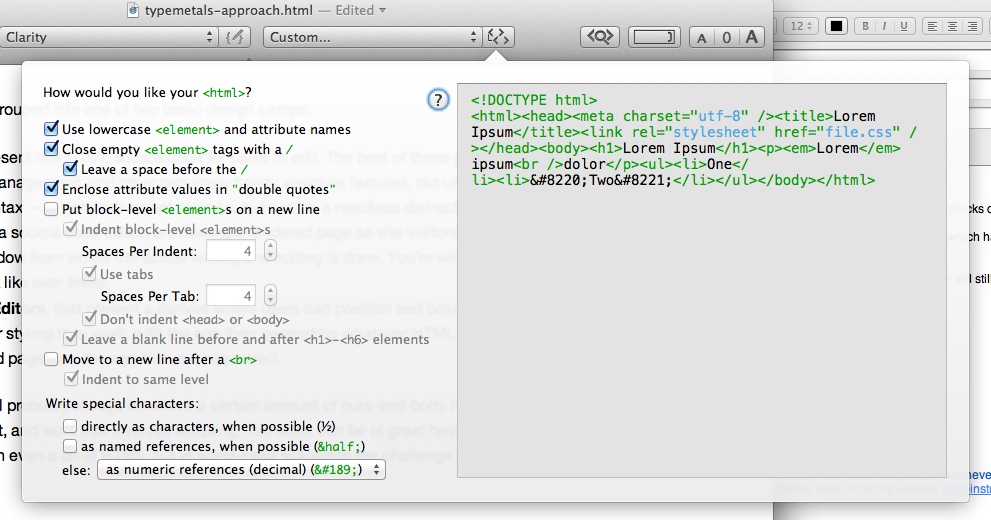
These preferences determine the formatting of HTML that you copy to the pasteboard.
WordPress tries to be helpful by automatically inferring line and paragraph breaks from what you type in its editor, but its helpfulness can yield bad markup when you paste fully-formed HTML that already contains paragraph tags. Leaving the line breaks out of what we copy and paste into WordPress avoids that.
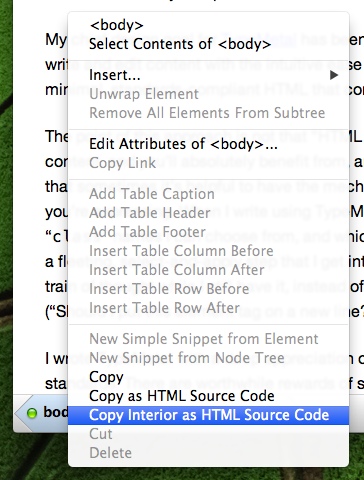
4. Use the path bar segment context menu as a handy way to copy the HTML you want to the pasteboard. TypeMetal’s “Copy Interior as HTML Source Code” command (here, applied by right-clicking the <body> segment) was designed exactly for this! The HTML gets copied using the formatting preferences that we set in (3).
5. Create a New Post in your WordPress Dashboard. Click the “Text” tab to use the Text editor instead of the Visual editor, and paste your HTML into the editing area (Cmd+V). Save your draft and preview it. You should be all set!
If you do end up making some last-minute adjustments in the WordPress editor, pulling your changes back into TypeMetal is easy:
1. Select all (Cmd+A) and copy (Cmd+C) from the WordPress post editing content area.
2. In TypeMetal, right-click <body> in the path bar and “Select Contents of <body>”.
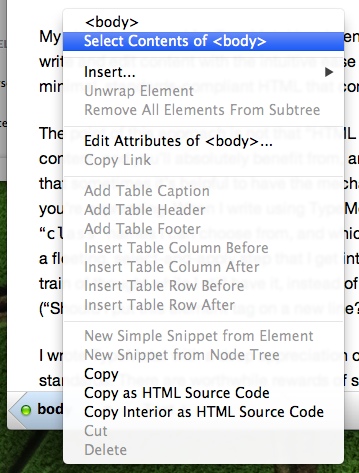
(You can also just Cmd+A to Select All, which selects <body>’s interior. The “Select Contents of …” approach is more general, and allows for you to replace the contents of any element you want — see below.)
3. Paste! TypeMetal interprets HTML in pasted plain-text, giving you a suitable replacement of your content. (When you want to paste plain text without interpreting any HTML in it, you can use “Paste as Plain Text”.)
If you want to get fancy, and see your posts styled using your WordPress theme while you type, you can save (using your Web browser) a copy of the archive page for an existing post. Then open the .html file in TypeMetal and replace the existing post’s body with your new content. Instead of copying the interior of <body> when you’re ready to copy your post content into WordPress, copy the content of the container element that holds your post’s content. (I’m using a standard WordPress setup, and in my case the container is a <div> element with classes “entry-content” and “e-content”.)