Tagboat
Tag your files, consistently.


Tag your files consistently to make them easy to find.
🛟
Classify them in ways that defy the limitations of folder trees.
🛟
Supercharge macOS’ tag support by adding inherited tags and keyboard shortcuts that make quick work of tagging.
Too many of us burn time trying to organize hard-to-classify things into strict folder trees. Tags offer an escape from the rigid constraints of folders, and can be an incredibly powerful tool for finding files, but they’re only useful when applied consistently, so they’ve ended up an under-utilized and often ignored macOS feature.
“I’ve been using a Mac for over 10 years now and I’ve never heard of tags in Finder.
How embarrassing!”
— Reddit comment
Tagboat extends your Mac’s file tagging support into a truly powerful tool, adding the ability to:
- quickly find and tag your untagged files
- tag consistently, and track your file-tagging progress
- define a “tree” of tags in which some tags imply others, helping you apply tags more quickly and consistently
- assign any of 62 hotkeys to your most frequently used tags, so you can apply them instantly (along with any tags they inherit)
- have files automatically inherit the tags of containing folders, if you wish
★★★★★ “After using Tagboat in my work as a teacher, organizing my research files and lectures has become a completely seamless experience. The big problem with traditional folders is that they limit how we think about and categorize information, and this app brilliantly solves that dilemma.”
— Customer Review, Mac App Store
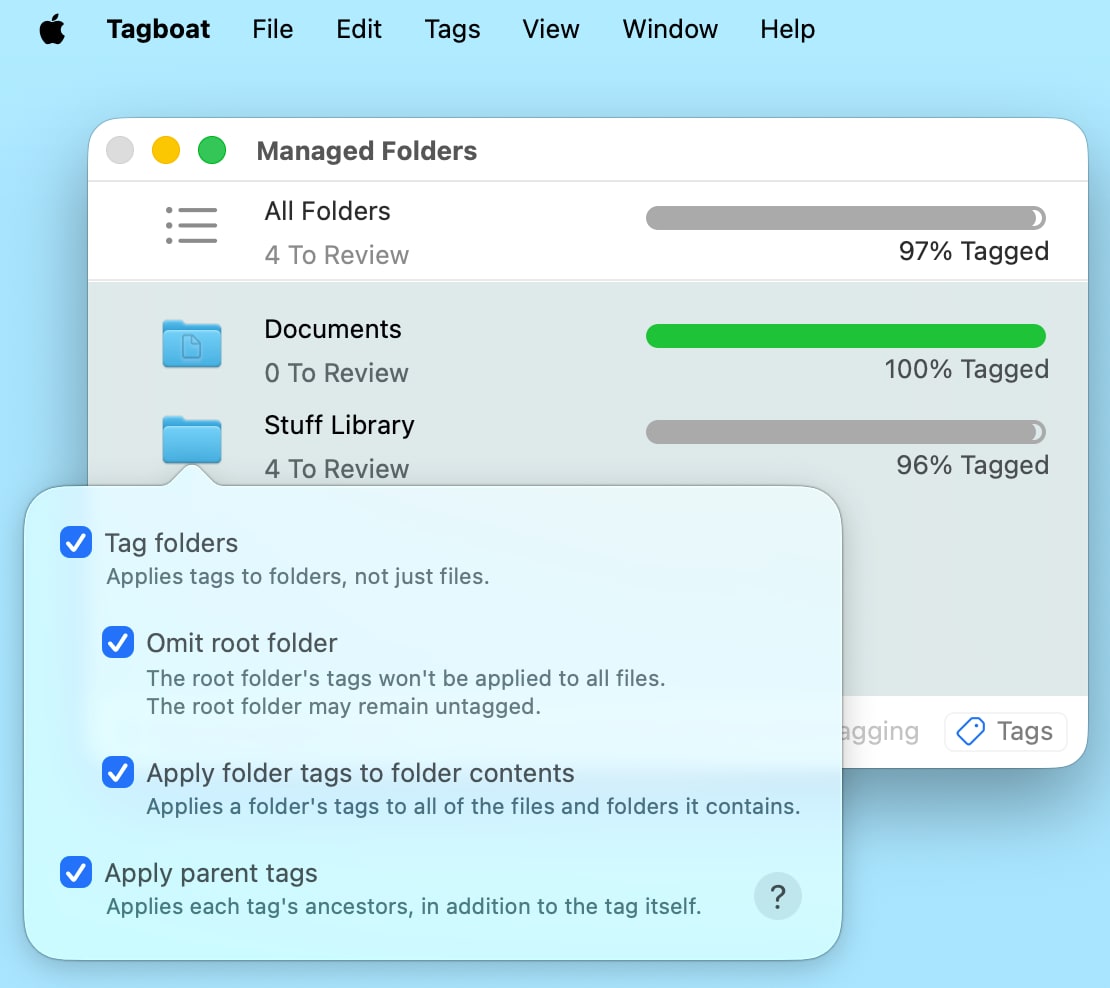
Tagboat makes your progress visible, and helps you keep chosen folders completely tagged and well organized — making it fast, easy, and rewarding to keep a consistent discipline of tagging your files. It also gives you options that let you work with different file collections in the ways that suit them best.
Tagboat also helps you build an intentional tag vocabulary, and keeps all your tags at your fingertips via hotkeys, quick completion, and full keyboard navigation for fast, efficient tagging.
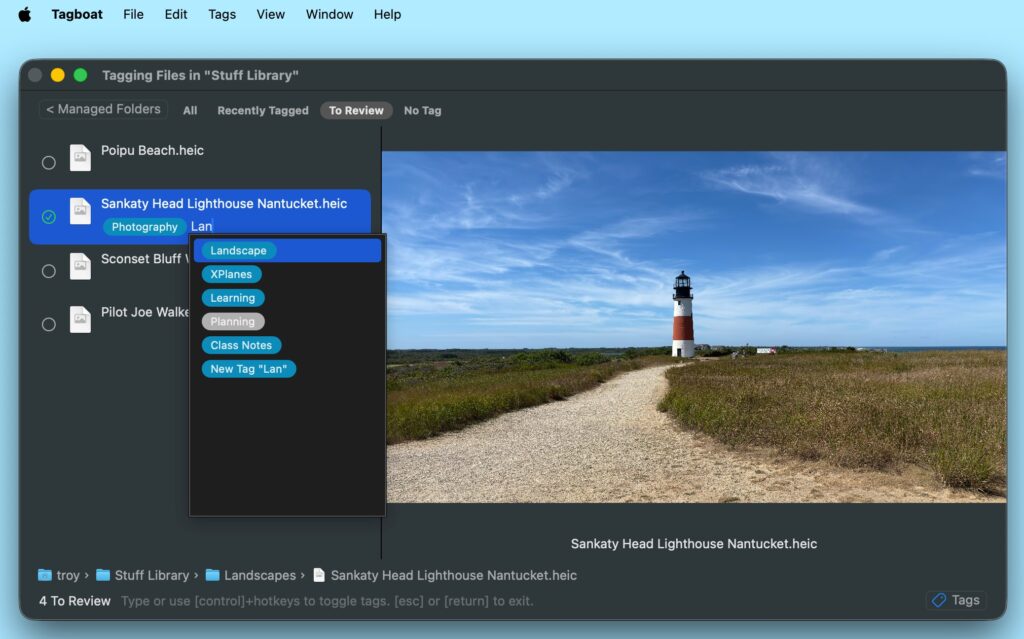
★★★★★ “[T]he progress tracking feature for tagging files within folders has helped me ensure all my files are consistently tagged, making sharing and collaboration much easier. The speed of adding tags via keyboard shortcuts makes the whole process smooth and not tedious, even with hundreds of files. I highly recommend every academic, researcher, or teacher struggling with digital file chaos to try this app. It’s a genuine investment in saving time and effort.”
— Customer Review, Mac App Store
Ready to really accelerate your file tagging? Try organizing your tags under parent tags. This lets you apply several tags at once, since nested tags bring their parents along automatically. And with Tagboat Pro, you can choose to let files inherit tags from their containing folders automatically.
“Nice work! The smart inheritance feature is a clever idea.”
— Reddit comment
★★★★★ “The most useful feature for me in academia is the inherited tags functionality, where I can place student files in course folders and they automatically inherit all the tags, then I add additional tags per file based on assignment type or topic. This has saved me hours of searching for scattered files.”
— Customer Review, Mac App Store
Once you’ve tagged your files, you can look them up instantly in a Spotlight or Finder search. Prefix your search term with “tag:” to instantly find all the files for a given tag. Tending your file garden in Tagboat makes the things you care about easy to find when you need them!
Ready to tag your files with speed, agility, and search-accelerating consistency? Get Tagboat free on the Mac App Store and get started today!
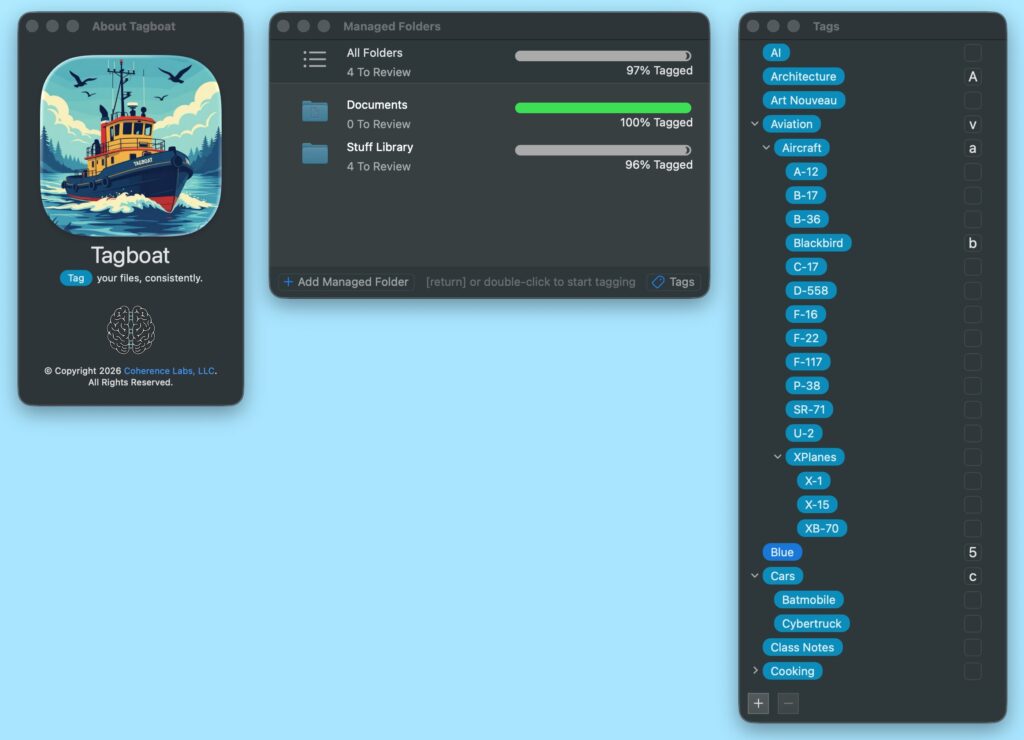
Its “Tags” window lets you assign your own tag hotkeys, and enables instant application of multiple tags by letting tags bring along the parent tags they’re nested under.
System Requirements
Tagboat works on macOS 14 through macOS 27.
Support
We provide direct email support for Tagboat. Write us anytime with questions or suggestions!
We also welcome you to subscribe to “Tagboat Tips”, for usage tips and the latest Tagboat news.
Tagboat comes with a complete User Guide that’s available online and in its Help menu.